
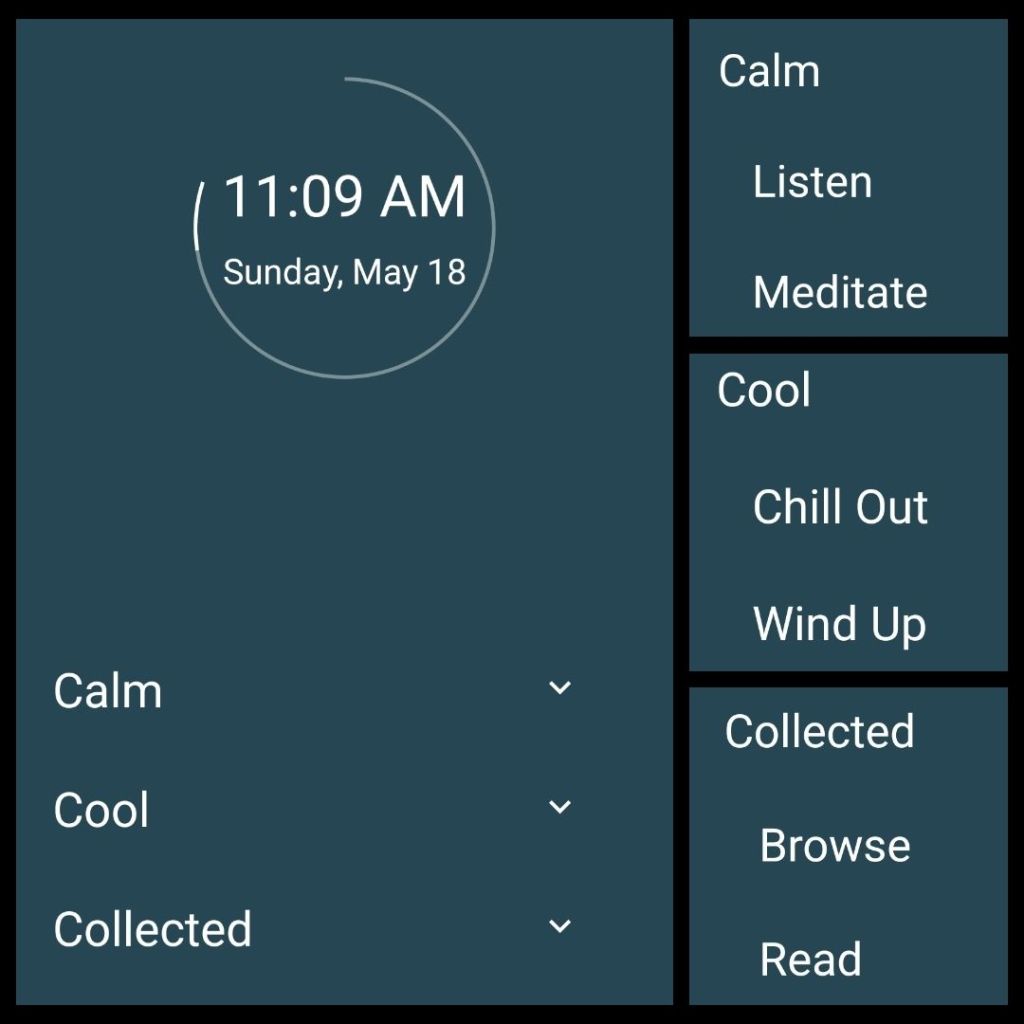
This past week my wife introduced/reintroduced me to an app, minimalist phone, for our homescreens to help us minimize the time we spend on our phones. I say “reintroduce” because I tried earlier in the year, but at the time, I was too attached to the theme I had on my phone for several years through Smart Launcher. I had folders organized by icons for apps I grouped by theme, e.g. planning, reading, writing, and listening to music. Now I’m ready for, and welcome, the change.
I’m sharing with you not necessarily as an advertisement for the app, but as a different way of thinking about how we interact with our phones. For me, this is what works…for now, anyway.
I chose the phrase “calm, cool, and collected” to tie it altogether as a reminder that that is my daily goal: to stay calm, cool, and collected. I also know the phrase can be, and often is, “cool, calm and collected,” but I thought “calm, cool, and collected” sounded better and my wife Kim agreed when I asked her feedback on which one to use. Plus “calm” is a good place to start each day.
At the top are the time and date, which when I tap the circle, that also indicates battery life, it takes me to the TickTick app that I use for my to-do list and calendar.
On each word is a dropdown menu for two apps each, which I have renamed.
Calm
The two apps I have here are:
- Podcast Player (Listen) for podcasts I am subscribed to, mostly mindfulness podcasts including from Tara Brach, Dan Harris, and Eckhart Tolle
- and Insight Timer for meditation (Meditate, obviously).
Cool
The two apps here are:
- Mixcloud, which has deejays from around the world I listen to, mostly chillout music hence the title “Chill Out.”
- YouTube Music that I renamed “Wind Up” for music to get motivated.
Collected
The two apps are:
- Libby (Browse) to search for books I might read.
- Kindle (Library) to see what books I have collected to read. However, I usually read on a Kindle Paperwhite, especially if reading poetry so I can turn the screen to landscape and have the line breaks the way the poet intended.
As for access to other apps, I can search a list by swiping left. The minimalist phone app also allows you to set an app timer for individual apps and ask you before opening the app if you really want to open. Then if you do, you can set how much time you will spend on on the app.
I didn’t include links to every app because I figured if you were interested, you could look up on your own. I also didn’t want to clutter the post with links. Today’s post also is part of The Sunday Salon hosted by Deb Nance of the blog Readerbuzz.


 Transmissions from the Northern Outpost